Best Freeware MIDI Software: 5 Free Tools Compared

The best freeware MIDI software depends on what you want to create. LMMS is a strong choice for electronic music and beat-making, MuseScore Studio is ideal for writing sheet music, and Waveform Free provides a more complete music production environment. If you only need to edit MIDI files, a dedicated MIDI editor may be more suitable than a full digital audio workstation (DAW).
Here are five options worth considering, including their main features, limitations, and official download pages.
Quick Comparison of Free MIDI Software
Software | Best for | Free model |
|---|---|---|
LMMS | Electronic music and beats | Free and open source |
MuseScore Studio | Sheet music and composition | Free and open source |
Waveform Free | MIDI and audio production | Free version with optional paid expansions |
REAPER | Advanced recording and MIDI editing | 60-day evaluation, then paid license |
MidiEditor | Editing existing MIDI files | Check the current official licensing terms |
The first three are the most straightforward starting points if you want to work without purchasing a license. REAPER is included as a comparison because its free evaluation is useful, but it should not be confused with permanently free software.
1. LMMS — Best for electronic music and beat-making

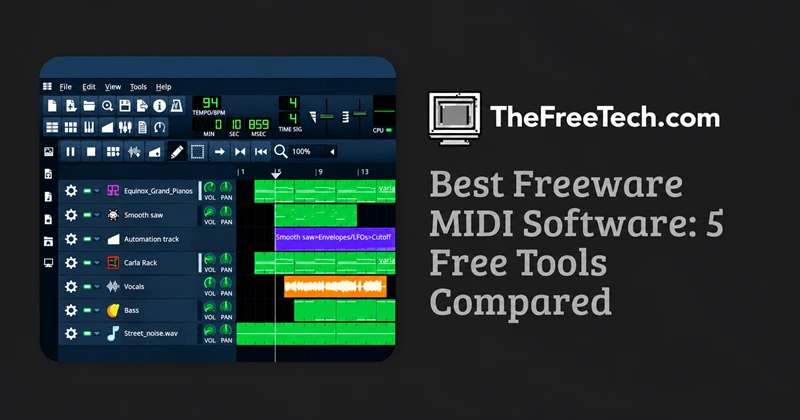
LMMS is a free, open-source DAW for Windows, macOS, and Linux. It includes a piano roll, beat sequencer, song editor, mixer, synthesizers, and support for MIDI files.
Advantages
No paid license required.
Built-in instruments and effects.
Piano-roll editing for melodies, chords, and rhythms.
Supports MIDI keyboards for note input.
Limitation: LMMS is primarily designed for music production, so users looking for conventional sheet music or a simple MIDI-file repair tool may prefer another application.
Official website: Download LMMS
2. MuseScore Studio — Best for sheet music and composition

MuseScore Studio is free, open-source music notation software. You can write notes on a score, hear the composition through software instruments, and import or export standard MIDI files.
Advantages
Compose with traditional musical notation.
Export MIDI for use in a DAW.
Print or export sheet music.
Useful for orchestral arrangements and piano compositions.
Limitation: It is designed around musical scores rather than the timeline and production workflow of a conventional recording studio.
Official website: Download MuseScore Studio
3. Waveform Free — Best for MIDI and audio production

Waveform Free is a free DAW from Tracktion. Its current product information describes MIDI editing, built-in instruments and effects, and support for third-party audio plugins. Optional paid expansions unlock additional capabilities.
Advantages
Combines MIDI sequencing with audio production.
Includes instruments and effects.
Suitable for arranging complete tracks.
Available for Windows, macOS, and Linux, with operating-system requirements varying by platform.
Limitation: Some advanced capabilities require paid expansions, so check the included features before committing to a workflow.
Official website: Download Waveform Free
4. REAPER — Best for advanced MIDI editing and recording

REAPER is a full-featured audio production application with MIDI recording, editing, processing, and routing. It supports Windows, macOS, and Linux.
Advantages
Flexible MIDI editing and routing.
Suitable for complex recording projects.
Extensive customization and plugin support.
Limitation: REAPER offers a fully functional 60-day evaluation, after which continued use requires the appropriate paid license. It is not permanently free.
Official website: Download REAPER
5. MidiEditor — Best for simple MIDI-file editing
Best for: Users who already have a .mid file and need to inspect or modify its notes and timing.
A dedicated MIDI editor can be more convenient than opening a full production studio when you only need to correct a few notes, adjust timing, or change a sequence.
Before choosing MidiEditor, verify its current licensing terms, operating-system compatibility, and available download from an official or verified project source. Its present free status and feature set have not been independently verified for this article.
Which freeware MIDI software should you choose?
Choose based on the task you need to complete:
I want to make beats and electronic music.
Start with LMMS. Its piano roll, sequencer, and built-in synthesizers support this workflow.
I want to write sheet music.
Choose MuseScore Studio for score-based composition and MIDI export.
I want to produce a complete song.
Try Waveform Free for a combination of MIDI sequencing, instruments, effects, and audio production.
I want advanced recording and editing controls.
Evaluate REAPER if you are comfortable with the time-limited trial and potential license cost.
I only need to fix an existing MIDI file.
Look for a dedicated MIDI editor with note, tempo, and timing controls rather than installing a full DAW.
How to Get Started with MIDI Software
If you are new to MIDI, follow these steps to create your first sequence.
Install the software. Download it from the official website and check that your operating system is supported.
Create a MIDI track. Open the piano roll or MIDI editor and create a short pattern.
Choose a virtual instrument. Select a piano, synthesizer, bass, or another instrument to hear your notes.
Connect a MIDI keyboard if needed. Select the keyboard as your MIDI input device in the application's settings.
Edit and play the sequence. Adjust note pitches, durations, velocities, and timing.
Export the MIDI file. Use the application's MIDI export function if you want to open the sequence in another compatible program.
One important distinction: a MIDI file does not contain a finished audio recording. It stores musical instructions, such as note pitches, durations, and performance events. The sound depends on the instrument or synthesizer used for playback, so the same file may sound different in different applications.
FAQ
Is freeware MIDI software really free?
Some applications are completely free and open source, while others provide a free edition with optional paid upgrades. Trial software, such as REAPER, has a limited evaluation period and should not be treated as permanently free.
Can I use free MIDI software with a MIDI keyboard?
Yes, provided the application supports MIDI input and your keyboard is recognized by your computer. You may also need to select the correct input device and configure a virtual instrument for playback.
Can I convert MIDI files into MP3 or WAV?
Many DAWs and notation programs can render MIDI performances to audio. However, MIDI export and audio export are different functions, and the available formats depend on the application.
Which free MIDI software is best for beginners?
LMMS is a practical starting point for making beats and electronic music. MuseScore Studio is better if you want to learn notation, while Waveform Free is worth exploring if you want a broader music production environment.