
How to Change Your Username on Snapchat

You can change your Snapchat username once every 12 months. Open Snapchat, go to your profile, tap the Settings gear icon, and select My Account → Username → Change Username. Enter your new username, tap Next, and confirm your password to complete the process.
Step-by-Step: How to Change Your Snapchat Username
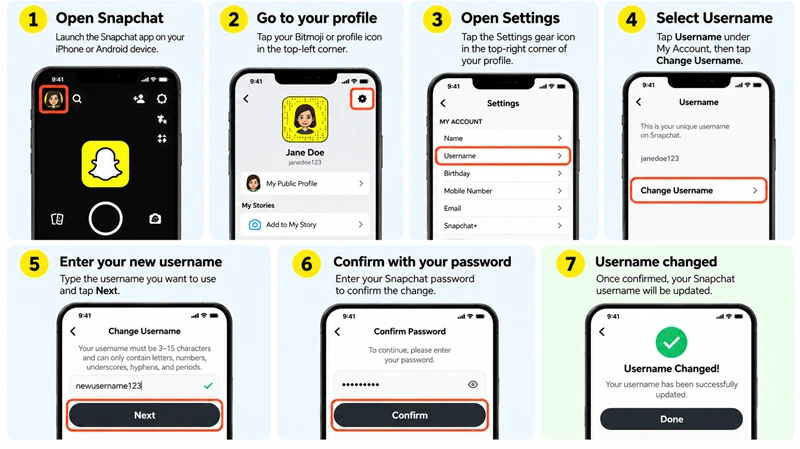
Step 1: Open Snapchat
Open the Snapchat app on your iPhone or Android device.
Step 2: Go to Your Profile
Tap your Bitmoji or profile icon in the top-left corner.
Step 3: Open Settings
Tap the gear icon in the top-right corner of your profile.
Step 4: Select Username
Under My Account, tap Username.
Step 5: Enter Your New Username
Tap Change Username, enter your preferred username, and tap Next.
Step 6: Confirm Your Password
Enter your Snapchat password to verify your identity, then tap Confirm.
Step 7: Finish Changing Your Username
After confirmation, Snapchat updates your username.
Snapchat Username Requirements
Before choosing a new username, remember these rules:
You can change your username only once every 12 months.
Your username must be between 3 and 15 characters long.
It must begin with a letter.
It must follow Snapchat's permitted character rules.
Your desired username must be available.
Username vs. Display Name
Your Snapchat username is different from your display name.
Username: Your unique account identifier, which can only be changed once every 12 months.
Display name: The name people see on your profile. You can change it whenever you want.
How to Change Your Snapchat Display Name
Open Snapchat and tap your profile icon.
Tap the Settings gear icon.
Select Name.
Enter your preferred display name.
Tap Save.
Why Can't I Change My Snapchat Username
You may be unable to change your username because:
You changed it within the last 12 months.
Your preferred username is already taken.
Your username does not meet Snapchat's requirements.
Your Snap Star account requires a username-change request.
For more information, visit Snapchat Support
FAQ
Can I change my Snapchat username twice in one year?
No. Snapchat allows username changes only once every 12 months.
Will changing my username delete my account?
No. Changing your username does not delete your account or erase your saved Memories, friends, or Snapstreaks.
Can I change my username without changing my display name?
Yes. Your username and display name are separate settings.




